



The landing page is the campaign. Most agencies don’t act like it.
Here’s something that most PPC agencies won’t tell you, because it undermines the way they charge for their work: your Google Ads campaigns are only as good as the pages they send traffic to.
You can have the tightest keyword targeting in the world. You can write ad copy that stops people mid-scroll. You can bid strategically, structure your campaigns perfectly, and squeeze every last penny of efficiency out of your account. None of it matters if the page your visitor lands on doesn’t convert them.
The landing page is where the actual conversion happens. It’s the page that loads when someone clicks your ad. It’s the form they fill in, the phone number they tap, the content that convinces them you’re the right company for the job. Everything upstream – the keywords, the ads, the bidding – is just the mechanism for getting someone to that page. The page itself does the heavy lifting.
And yet the vast majority of PPC agencies treat landing pages as an afterthought. They’ll build you a page on Unbounce or Instapage, point your ads at it, and then spend all their time optimising inside Google Ads. If your conversion rate is low, their answer is almost always the same: spend more money. Get more clicks. Increase the budget.
That’s the wrong answer. If your landing page converts at 2% and you double your ad spend, you get twice as many visitors and the same terrible conversion rate. But if you keep the same spend and double your conversion rate to 4%, you’ve doubled your leads without spending an extra penny on ads. The ROI improvement is transformational – not incremental.
Double your conversion rate instead of doubling your spend. This is the fundamental problem we set out to solve when we built Canopy.
Why we built it
We’ve been running PPC campaigns for clients across dozens of industries for over a decade. In that time, we’ve dealt with every landing page scenario imaginable – and none of them were good enough.
Some clients had their own websites with hosting so slow that Google penalised their ad quality scores. Some had page builders so limited that we couldn’t build the layouts we needed. Some had completely bespoke WordPress builds where every change required a developer and a two-week turnaround. Some had content management systems so awful that updating a headline was a three-step process involving FTP access.
And then there was Unbounce. For a while, Unbounce was the closest thing to a solution. A hosted landing page builder with A/B testing, form tracking, and a drag-and-drop editor. The problem? The page builder itself was restrictive. The designs it produced looked like Unbounce pages – you could always tell. The hosting was somebody else’s server, which meant your pages lived on a third-party domain unless you fiddled with DNS. And it cost hundreds of pounds per month, per client. For an agency managing dozens of clients, that’s a significant overhead that either eats into margins or gets passed on as an additional cost that’s hard to justify.
Nothing unified the experience across our client base. Every client had a different setup, a different set of limitations, and a different set of compromises. We needed a platform that gave us full creative control, ran on infrastructure we owned, hosted pages on the client’s own domain, tracked everything that mattered, pulled in Google Ads data automatically, and did all of it without charging a per-client subscription fee.
Nothing like that existed. So we built it.
What is Canopy?
Canopy is Gorilla Marketing’s in-house landing page platform. We design, build, and host your PPC landing pages on it. You get a clean, modern dashboard where you can see your pages, view their performance in real time, track conversions, see your Google Ads spend, and understand exactly what visitors are doing on your pages – all from a single login.
It replaces tools like Unbounce, Instapage, and Leadpages. But it goes significantly further than any of them, because it was built specifically for the way paid media campaigns work – not as a generic website builder with some analytics bolted on.
Three things to understand about Canopy:
It sits on your website. Your landing pages live on your domain – either through a WordPress plugin installed on your existing site, or via a CNAME record pointing a subdomain to our servers. Either way, your visitors see your domain in the address bar. Not ours. Not Unbounce’s. Yours.
It’s included in your PPC management. Canopy isn’t an additional subscription or a separate line item. If you’re a Gorilla Marketing PPC client, your landing pages are built and hosted on Canopy as part of the service.
It was built from scratch. This isn’t a white-labelled SaaS tool with our logo on it. Canopy is a completely bespoke, completely unique platform. Every line of code was written specifically for this purpose. There is no other product like it on the market.
Your domain, your brand, your Quality Score
When someone clicks your Google Ad, the first thing they see is the URL in their browser. If that URL says yourbrand.unbounce.com or pages.leadpages.com, you’ve already lost a fraction of trust before the page even loads. It looks like a marketing page. It looks temporary. It doesn’t look like your company.
With Canopy, your landing pages live on your own domain. The visitor sees yourdomain.com/service-name or landing.yourdomain.com – consistent with the rest of your web presence. SSL is provisioned automatically. The DNS setup is handled by us. You don’t touch any hosting configuration.
This matters for more than just appearances. Google Ads explicitly factors landing page experience into your Quality Score – the metric that determines how much you pay per click and where your ads appear. A landing page on your own domain, loading fast, with relevant content, scores higher than an equivalent page on a third-party builder’s subdomain. Higher Quality Score means lower cost per click, which means more visitors for the same budget. It’s compound efficiency: better pages, better scores, cheaper clicks, more traffic, more conversions.
Two ways to connect
WordPress Plugin. If your main website runs on WordPress, we install the Canopy Connector plugin. It’s lightweight – one file in your plugins folder. You enter your Client ID and API Key from the Canopy dashboard, map URL paths to specific landing pages, and the plugin takes care of the rest. When a visitor hits yourdomain.com/your-landing-page, the plugin fetches the content from Canopy, caches it locally, and serves it as if it were a native page on your site. No separate hosting. No subdomain. No DNS changes.
CNAME subdomain. If your site isn’t on WordPress, or if you prefer to keep landing pages on a dedicated subdomain, you create a single CNAME record pointing something like landing.yourdomain.com to our servers. We handle the SSL certificate, the domain mapping, and the routing. The result is the same: your visitors see your domain, your landing page loads on your infrastructure, and everything is tracked automatically.
Pages that actually perform
Every Canopy landing page is built with Elementor Pro – the same professional visual page builder used by web designers worldwide. This isn’t a simplified drag-and-drop tool with a handful of templates. It’s a full design environment with responsive controls, custom CSS, multi-step forms, animations, dynamic content, sticky headers, custom fonts, and pixel-level layout precision.
We took the creative power of Elementor and paired it with NitroPack for delivery – a CDN and performance optimisation layer that compresses images, lazy-loads assets, minifies code, and serves pages from edge locations close to your visitors. The result is landing pages that look bespoke, load in under two seconds, and consistently achieve the page speed scores that Google Ads rewards with a 10/10 Quality Score.
This combination solves a problem we’ve wrestled with for years. Generic builders like Unbounce give you speed but limit your design. Custom WordPress builds give you design freedom but create a maintenance and hosting nightmare. Canopy gives you both: full creative control with performance that actually moves the needle on your ad costs.
Every page we build on Canopy is designed with conversion in mind – not just aesthetics. Clear visual hierarchy. Prominent calls to action. Forms that work on mobile. Content structured to answer the visitor’s question and remove friction from the conversion path. The design serves the campaign, not the other way around.
A dashboard you’ll actually use
When you log in to Canopy, you don’t need a password. Enter your email address and we send you a secure login link – click it and you’re in. No credentials to remember, no password resets, no friction.
The dashboard gives you the full picture at a glance. Stat cards across the top show your total visitors, conversions, conversion rate, and form enquiries – each with period-over-period change indicators so you can immediately see whether performance is trending up or down. Below that, a daily traffic chart plots visitors and conversions over time, alongside a conversion breakdown showing exactly how your leads are coming in: form submissions, phone calls, and email clicks. A top-performing pages table ranks your landing pages by visitor count, conversions, and conversion rate.
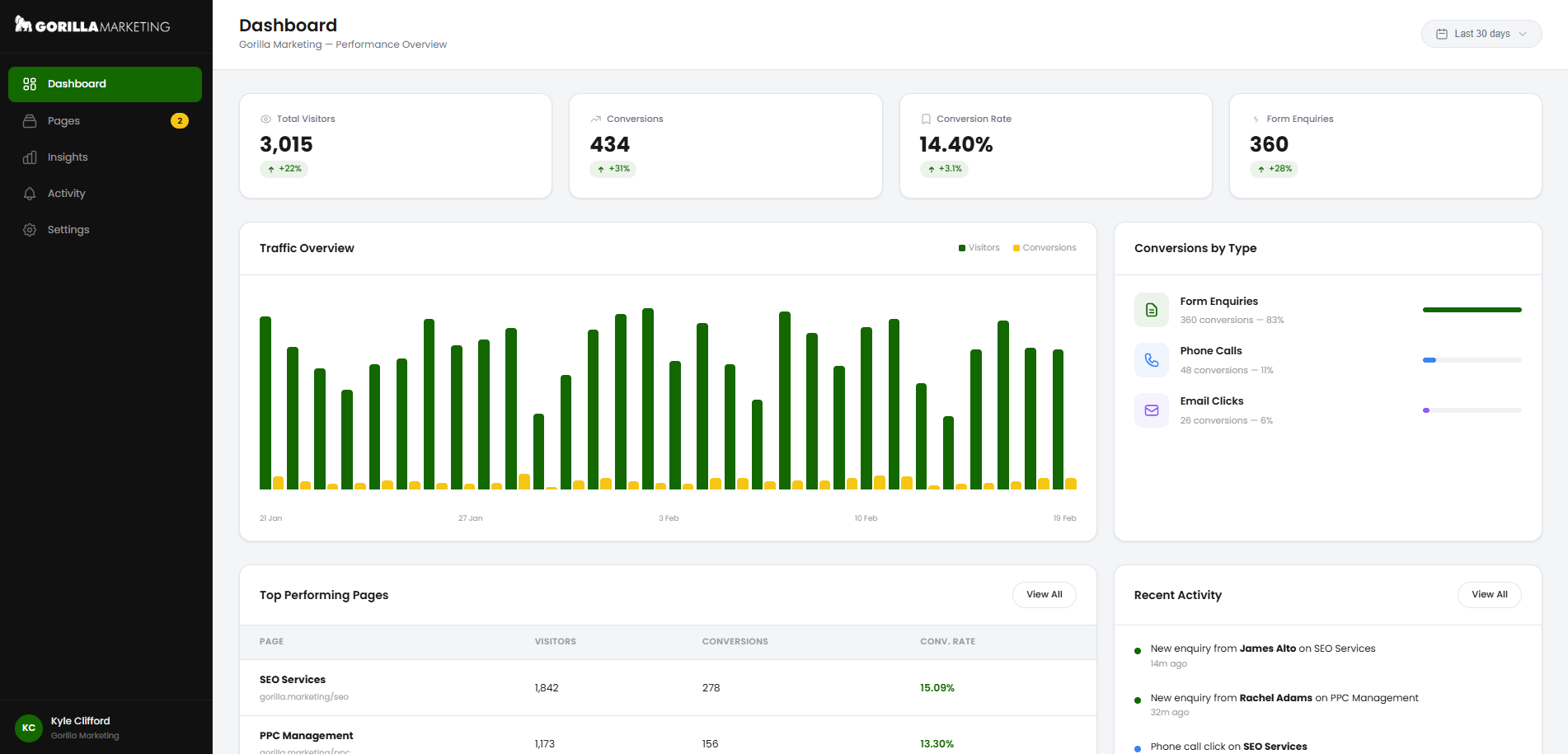
This isn’t a developer tool or a wall of raw data. It’s built for business owners and marketing managers who want to see how their campaigns are performing without logging into five different platforms and cross-referencing spreadsheets. Everything you need is in one screen, updated in real time.
Campaign insights: the full picture
The Insights section is where Canopy goes beyond anything a standalone landing page builder can offer. It brings together your landing page analytics and your Google Ads campaign data in a single, unified view – three tabs that give you complete visibility over your campaign performance.
Overview
The Overview tab shows your high-level metrics: total pageviews, unique visitors, bounce rate, average session duration, and total conversions. Below that, a Traffic & Conversions chart plots daily performance over your selected date range. And at the bottom, a Page-Level Performance table shows every landing page with its sessions, unique visitors, bounce rate, average time on page, conversions, conversion rate, ad spend, and cost per lead – all in one row.
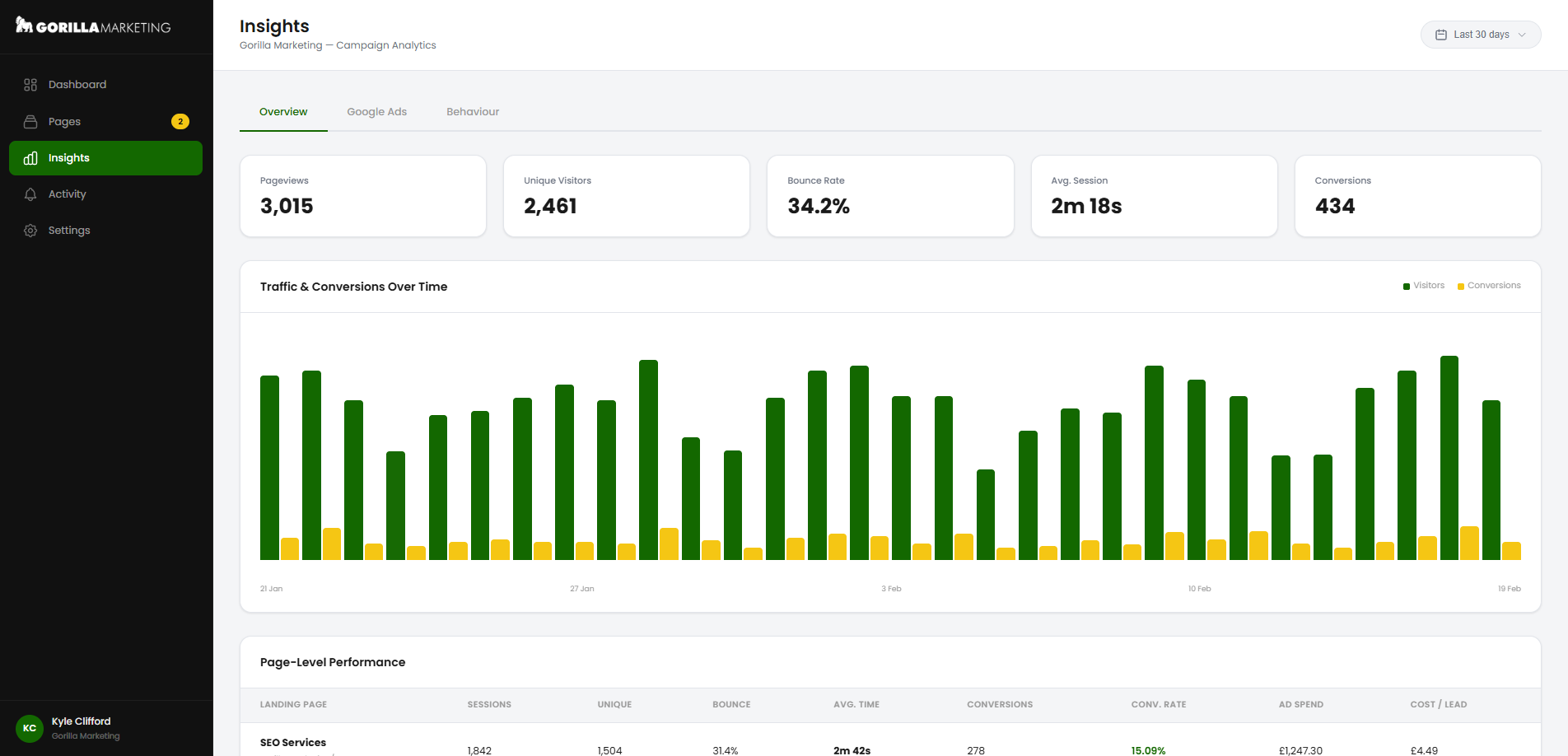
This is the view that changes how you think about your campaigns. You’re not looking at Google Ads data in one tab and landing page data in another – you’re seeing exactly how much you spent on each page, how many people converted, and what each lead cost you. Unbounce shows you landing page stats. Google Ads shows you campaign stats. Nobody puts them side by side in a single view tied to the actual page. Canopy does.
Google Ads
The Google Ads tab pulls directly from the Google Ads API and shows your total ad spend, impressions, clicks, and click-through rate. A Spend by Campaign panel breaks down exactly where your budget is going – showing each campaign with its click count, CTR, and total spend. Alongside it, a Cost Per Lead by Page panel calculates your actual acquisition cost for each landing page, highlighting which pages are delivering the best value and which are costing you the most per conversion.
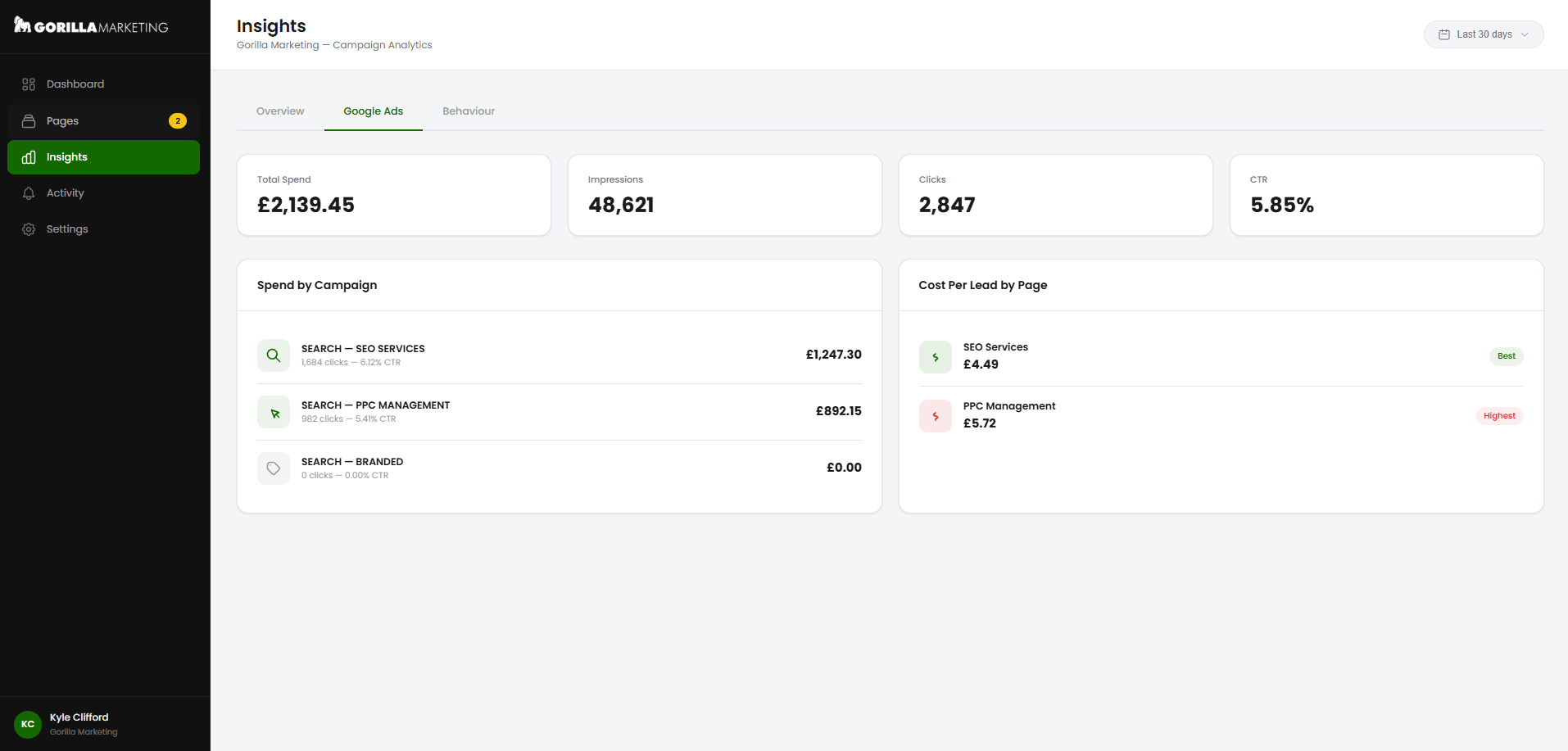
This is real-time, live data from your Google Ads account – not an estimate, not a third-party approximation. You can see that your SEO Services campaign spent £1,247.30 and delivered leads at £4.49 each, while your PPC Management campaign spent £892.15 at £5.72 per lead. That’s the kind of granularity that drives actual optimisation decisions.
Behaviour
The Behaviour tab shows you what visitors actually do on your pages. A Page Behaviour table lists each landing page with its session count, average time on page, bounce rate, and average scroll depth – so you can see at a glance whether visitors are engaging with your content or leaving before they reach the form.
Below that, Spend per Page and Cost per Acquisition by Page panels tie your engagement data back to your ad investment. And at the bottom, a Click Heatmaps section shows the total clicks tracked on each page, the top element visitors are clicking (your primary CTA, your phone number, your form), and a breakdown by device type – with a button to view the full visual heatmap overlay for any page.
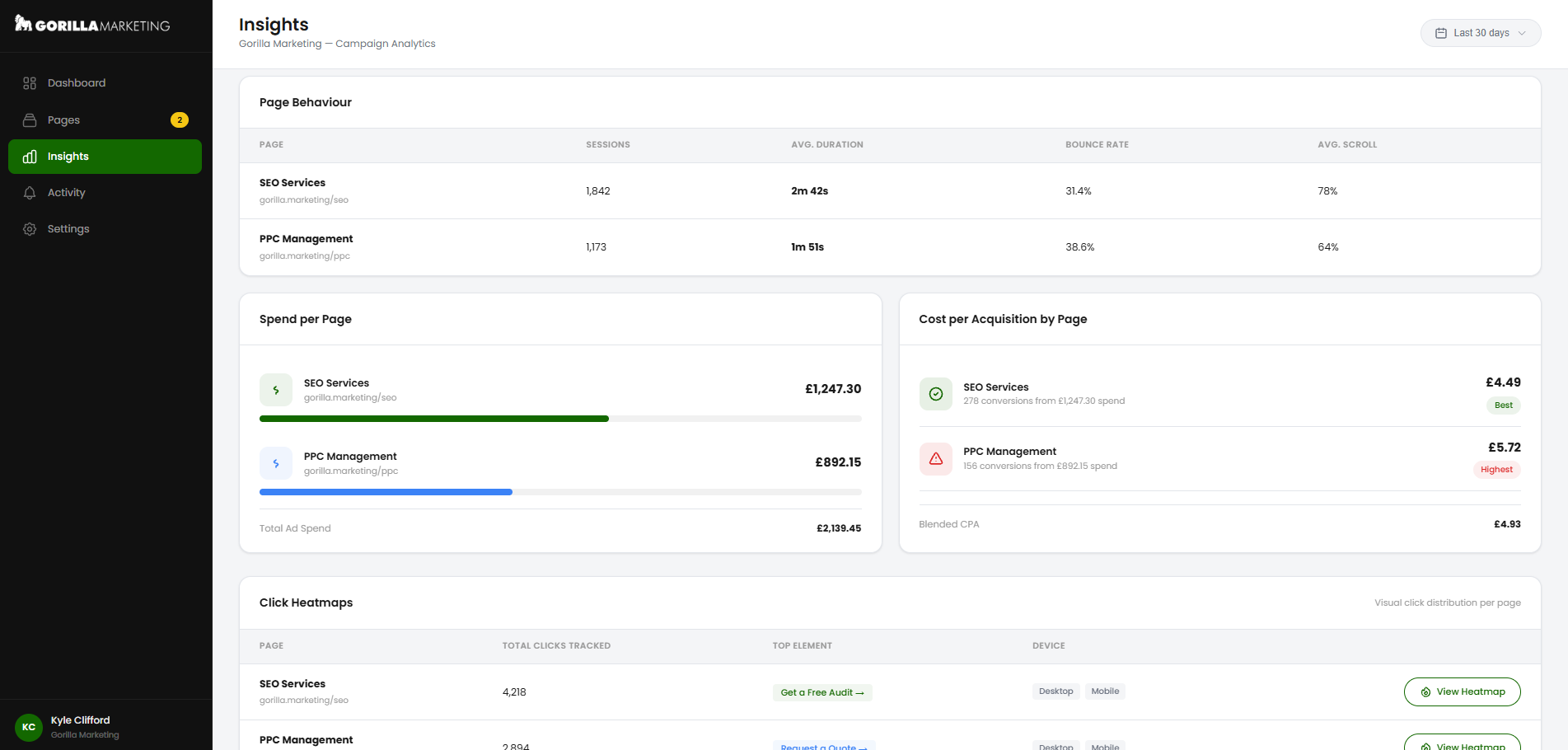
This is data that normally requires a separate tool like Hotjar or Microsoft Clarity. With Canopy, it’s built in – no additional scripts, no extra subscriptions, no separate login.
Every conversion, tracked and logged
The Activity view gives you a real-time feed of every conversion event happening across your landing pages. Stat cards show your totals – form enquiries, phone calls, email clicks – and filter tabs let you drill into each type. The activity feed below shows each event as it happens: who submitted the form, what their email address was, which landing page it came from, and when.
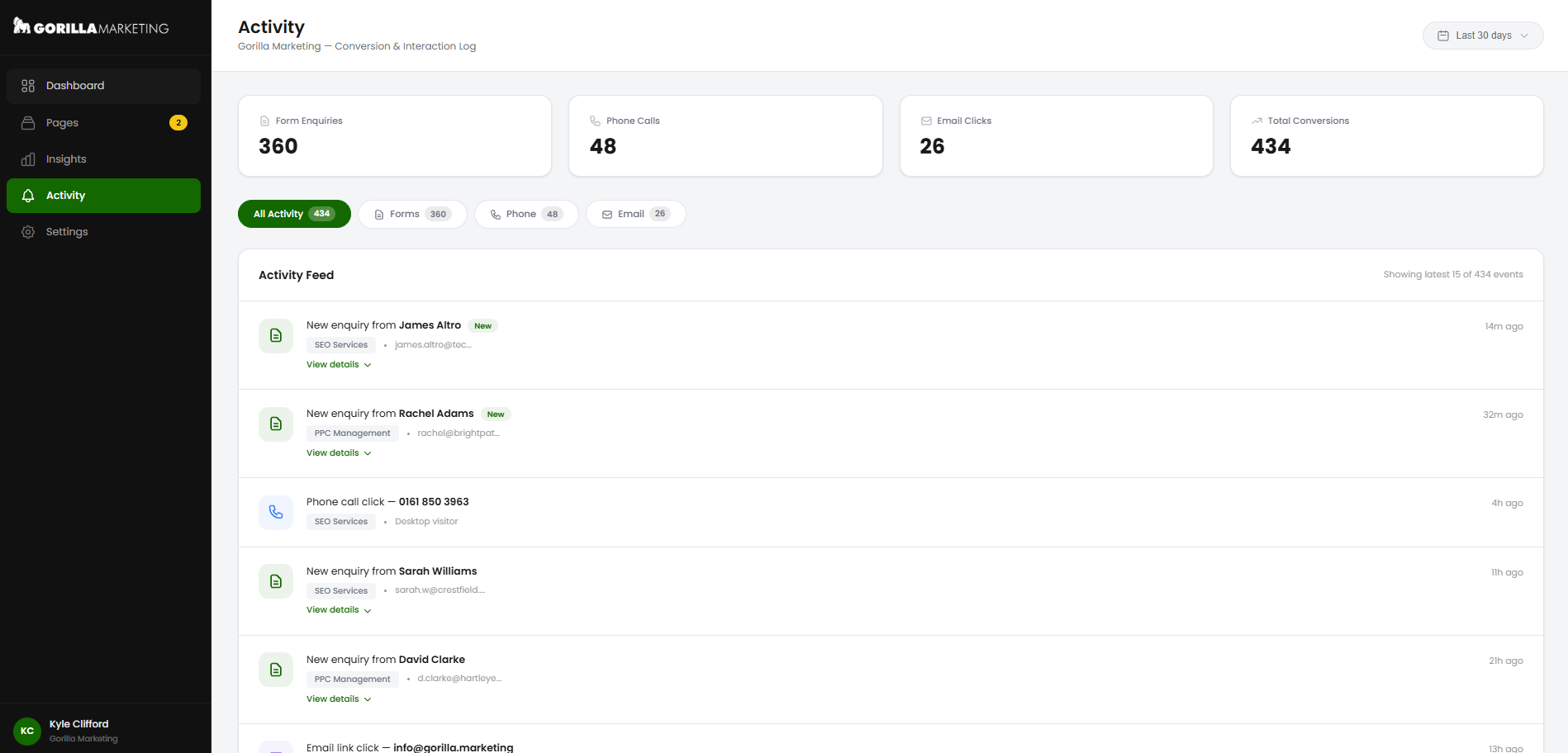
Every form submission is a named lead with contact details you can act on immediately. Phone call clicks show the exact number dialled and the device that made the call. Email clicks log the address that was clicked. This isn’t an abstract conversion count in Google Ads – it’s a feed of real people reaching out to your business, with every detail captured.
You can optionally receive an email notification for every new enquiry, so you never miss a lead – even if you don’t log in to the dashboard.
Analytics that go beyond GA4
Every Canopy landing page has a lightweight analytics tracker – under 4KB – embedded in the page head. It runs as first-party code on your domain, which means it isn’t blocked by ad blockers, doesn’t require cookie consent banners in most implementations, and captures data that Google Analytics routinely misses.
Here’s what Canopy tracks natively, on every page, automatically:
Pageviews and unique visitors. Every visit is recorded with session and visitor IDs. No sampling, no JavaScript execution dependency, no reliance on third-party cookies.
Form submissions. Every form submitted on a Canopy page is tracked as a conversion event. You see it in the dashboard immediately, with the submitter’s details in the Activity feed.
Phone clicks. If a visitor taps a phone number link on your landing page, Canopy records it as a conversion event. On mobile, this is often the primary conversion action – and most analytics setups miss it entirely.
Scroll depth. How far down the page did your visitors actually scroll? If 80% of visitors never reach your form because it’s below the fold, that’s actionable intelligence. Canopy tracks it automatically.
Time on page. Not the bounced-session-zero-second nonsense that GA4 reports. Canopy uses a heartbeat mechanism that records actual engaged time on the page, with 15-second precision.
Heatmap click data. Every click on the page is recorded with X/Y coordinates and the element that was clicked. This builds a visual heatmap showing where visitors are actually engaging – and where they’re not.
UTM parameters and traffic sources. Canopy captures the full UTM string from your ad URLs and categorises traffic by source: paid search, organic, direct, social, email, referral.
Device breakdown. Mobile, desktop, tablet – with percentages so you can see whether your mobile experience is pulling its weight.
GA4 and Google Tag Manager can still be added alongside Canopy tracking via the Settings panel. It’s additive – we’re not asking you to replace your existing analytics. We’re giving you a more accurate, more detailed layer on top of it.
Feeding into Gorilla Reports
Canopy doesn’t exist in isolation. It feeds directly into Gorilla Reports, our client reporting platform, so your landing page performance becomes a standard part of your ongoing campaign reporting.
Your monthly reports don’t just show keyword rankings, ad impressions, and click data – they show how visitors behaved on your landing pages, which pages are converting best, what your real cost per lead is, and how performance is trending over time.
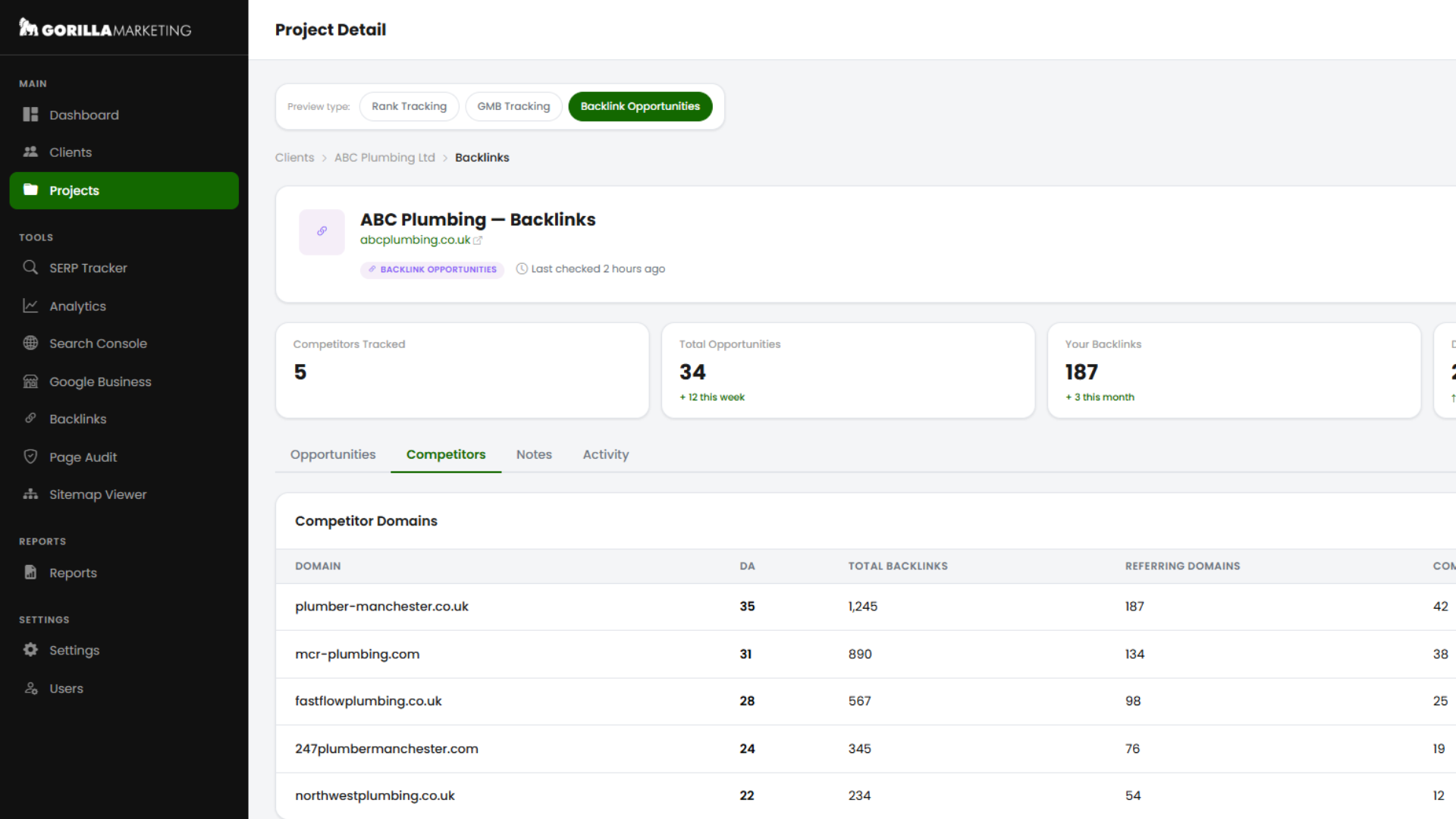
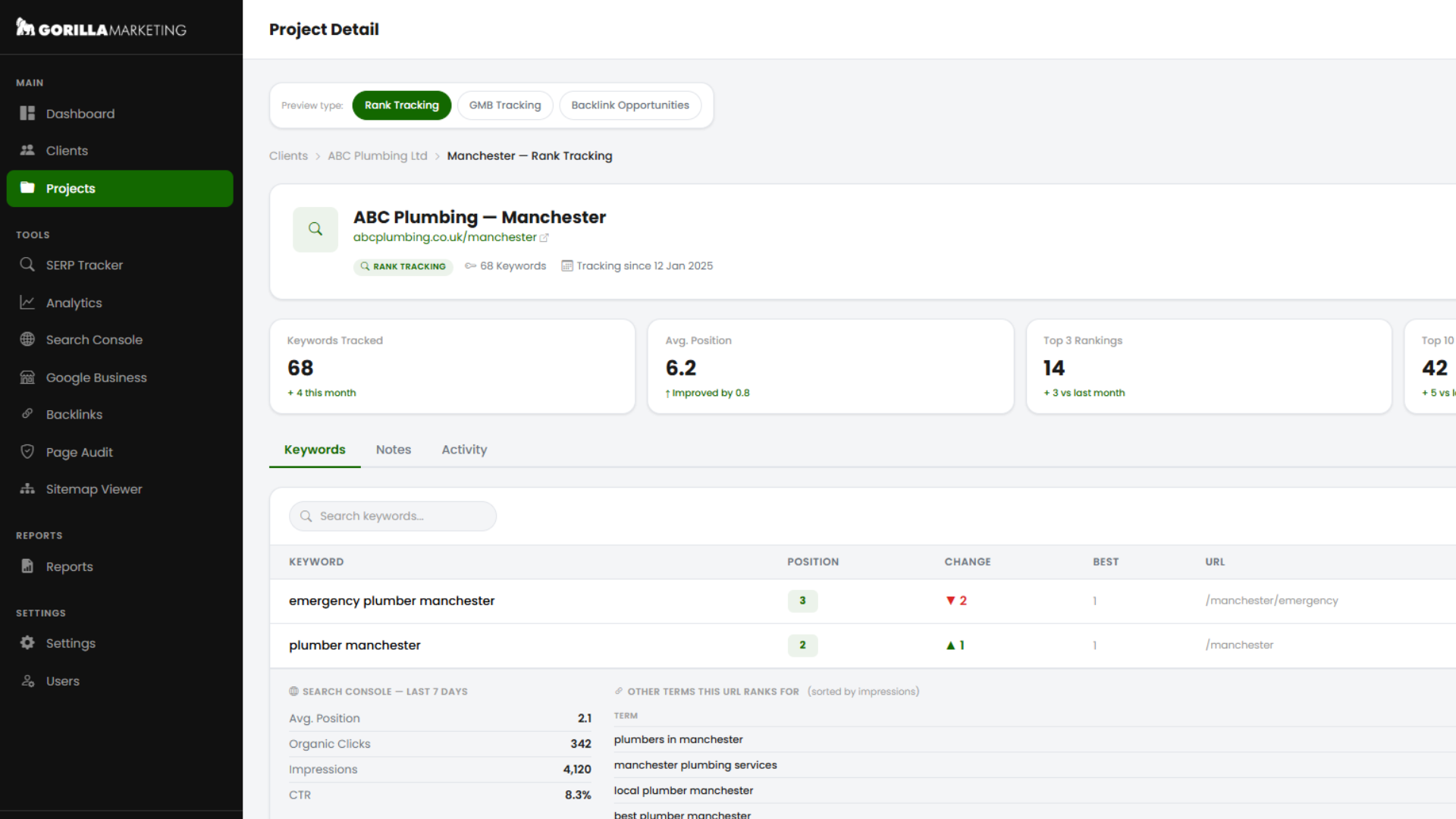
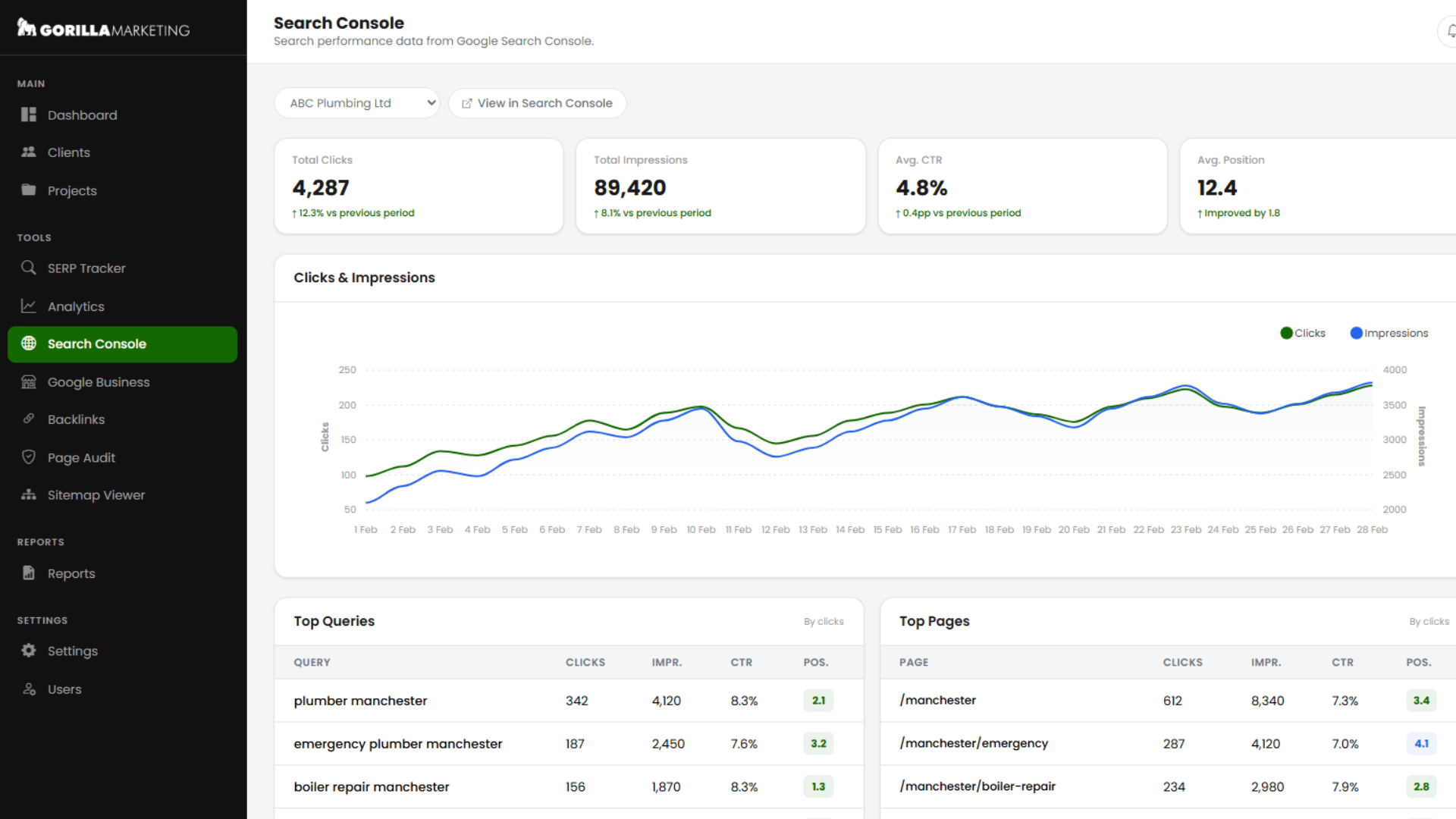
The connection between Canopy and Gorilla Reports is automatic. No manual exports, no screenshots, no copy-pasting between tools. This closes a loop that most agencies leave wide open: they’ll report on what happened inside Google Ads, but they can’t tell you what happened after the click. With Canopy and Gorilla Reports working together, every stage of the funnel is visible – from impression to click to page visit to engagement to conversion to cost per lead.
What this means for your campaign
The maths is straightforward, and it’s worth spelling out.
Suppose you’re spending £5,000 per month on Google Ads and your landing page converts at 2%. If your average cost per click is £5, that’s 1,000 visitors and 20 leads per month – a cost per lead of £250.
Now suppose we rebuild your landing page on Canopy. Faster loading, better design, proper mobile experience, clear conversion path. Your conversion rate goes from 2% to 4%. Same spend, same traffic, but now you’re getting 40 leads instead of 20. Your cost per lead drops from £250 to £125. You’ve effectively doubled your return on ad spend without adding a penny to your budget.
That’s not a theoretical scenario. That’s the kind of improvement we see routinely when we move clients from generic page builders or slow websites onto purpose-built Canopy landing pages. The landing page was always the bottleneck – most agencies just never had the tools to see it, let alone fix it.
Better landing pages mean better Google Ads Quality Scores. Better Quality Scores mean lower costs per click. Lower costs per click mean more visitors for the same budget. More visitors hitting a higher-converting page means dramatically more leads. Every improvement compounds on the last one.
Doubling your ad spend doubles your leads (at best). Doubling your conversion rate doubles your leads and halves your cost per lead. The landing page is the multiplier. Canopy is the platform that makes it possible.
The bottom line
Canopy isn’t an off-the-shelf page builder with a Gorilla Marketing logo on it. It’s not a reskinned version of something you can buy elsewhere. It’s a completely bespoke, completely unique landing page platform – built from scratch over thousands of hours of development – designed specifically around how PPC campaigns actually work.
We built it because nothing else gave us what we needed: full creative control, proper analytics, Google Ads integration, custom domain hosting, and a client dashboard that actually makes sense. We built it because we were tired of telling clients their landing page was the problem and not having a platform that could fix it. We built it because the gap between what Unbounce offered and what our campaigns needed was too wide to keep bridging with workarounds.
Every Gorilla Marketing PPC client’s landing pages are built and hosted on Canopy. If you’re already working with us, your pages are either on Canopy now or will be shortly. If you’re not – and you want to see what a PPC agency looks like when they take landing pages as seriously as they take the ads – get in touch.
Want to see Canopy in action? Get in touch with Gorilla Marketing and we’ll walk you through it.

