



AI crawlers are hitting your website right now. You just can’t see them.
Right now, as you read this, AI systems are crawling your website. ChatGPT, Claude, Perplexity, Gemini, and dozens of other bots are requesting your pages, reading your content, and feeding it into their models. Some are scraping your content for training data. Others are pulling your pages in real-time because someone just asked an AI chatbot a question about your business.
And you almost certainly have no idea it’s happening.
Google Analytics doesn’t show it – it filters out bot traffic by design. Google Search Console gives you a limited subset of Googlebot data, delayed by days. Third-party SEO tools estimate and sample. None of them show you the full picture.
The only place this data actually lives – the complete, unfiltered, real-time record of every single bot that hits your server – is your server’s raw access logs. And virtually nobody is reading them.
That’s why we built Gorilla AI Log.
The Problem: You’re Being Crawled and You Don’t Know It
The volume of AI crawler traffic has exploded. Cloudflare’s 2025 data showed GPTBot traffic increasing by 305% year-on-year. PerplexityBot surged by over 157,000%. Overall AI bot traffic grew roughly 300% during 2025 alone. ByteDance’s Bytespider, OpenAI’s various bots, Anthropic’s ClaudeBot, Meta’s ExternalAgent – the list grows every quarter.
Meanwhile, AI crawlers now account for a measurable share of all web traffic. Hostinger’s analysis of 66.7 billion bot requests showed OpenAI’s search crawler coverage growing from 4.7% to over 55% of sites in their sample. These aren’t fringe bots hitting a handful of pages – they’re systematic, high-volume crawlers consuming your content at scale.
And here’s the critical gap: your existing analytics tools are blind to all of it. GA4 filters bots out. Search Console only reports on Googlebot (and even then, with significant delay and sampling). Third-party monitoring tools rely on JavaScript tags that most AI bots don’t even execute. You’re flying completely blind on one of the most significant shifts in how your content is being consumed.
What Is Gorilla AI Log?
Gorilla AI Log is a self-hosted, password-protected dashboard that reads your server’s raw access logs and identifies every AI crawler, search engine bot, and SEO tool visiting your site. It’s two files – an HTML dashboard and a PHP API – uploaded directly to your cPanel hosting. No third-party services. No external JavaScript tags. No data leaving your server.
The PHP backend parses your server’s access logs in real-time, matching user agent strings against a comprehensive database of known bots. The frontend visualises everything in a clean, interactive dashboard: hit volumes, daily trends, hourly patterns, crawler breakdowns, status codes, top pages, and individual bot behaviour.
Because it works directly with cPanel hosting, you get access to historic log data too – not just what’s happening today, but what’s been happening for weeks or months, depending on your host’s log retention. And it feeds directly into Gorilla Reports, our reporting platform, giving you ongoing crawler intelligence as part of your regular performance reporting.
The setup is straightforward: we place a file on your server that speaks to the platform. It works exclusively with cPanel hosting environments, reading the access logs that your server is already generating. No additional server configuration, no ongoing maintenance, no third-party dependencies.
The Bots: What They Are and What They Mean
Not all bots are created equal. Each serves a fundamentally different purpose, and understanding the distinction is essential if you want to make informed decisions about your content’s visibility in the AI ecosystem.
Gorilla AI Log categorises every detected bot into one of three types – AI, Search, or SEO Tool – and further distinguishes between automated crawlers and user-triggered fetches. That second distinction is particularly important: it’s the difference between a bot scraping your content for training data and a real person asking an AI chatbot about your business.
AI Crawlers – Training Bots
These are automated bots that systematically crawl the web to collect content for AI model training. They run on schedules, follow links, and gather data at scale. Seeing these in your logs means your content is being consumed as training material for large language models.
| Bot Name | Company | What It Does |
|---|---|---|
| GPTBot | OpenAI | Collects content for training GPT models (GPT-4, GPT-5 etc). Does not index for search results. Blocking this stops your content being used in OpenAI’s model training but won’t affect ChatGPT search visibility. |
| ClaudeBot | Anthropic | Collects web content for Claude AI model training. Blocking signals your content should be excluded from future Anthropic training datasets. |
| anthropic-ai | Anthropic | Deprecated predecessor to ClaudeBot – still appears in some older log entries. Same purpose: model training data collection. |
| Google-Extended | Training crawler for Google’s Gemini AI models. Entirely separate from Googlebot – blocking this has zero impact on your Google Search rankings. | |
| Bytespider | ByteDance | ByteDance’s AI data collector, linked to TikTok and related AI systems. Was historically one of the most aggressive crawlers on the web. |
| CCBot | Common Crawl | Open dataset crawler. Common Crawl’s dataset is used as foundational training data by many AI companies. |
| Meta-ExternalAgent | Meta | Meta’s bot for collecting data to train and fine-tune their large language models (Llama etc). |
| FacebookBot | Meta | Meta’s general web crawler, used for content understanding and AI applications. |
| Amazonbot | Amazon | Amazon’s crawler for AI and search applications including Alexa and Amazon’s product recommendations. |
| cohere-ai | Cohere | Training crawler for Cohere’s enterprise AI models. |
| Diffbot | Diffbot | Knowledge graph builder – structures web data into machine-readable formats for AI applications. |
| AppleBot-Extended | Apple | Apple’s AI training crawler for Apple Intelligence features. Separate from regular Applebot (Siri/Spotlight search). |
| YouBot | You.com | Crawler for You.com’s AI-powered search engine. |
| ImagesiftBot | Imagesift | Image-focused AI data collection crawler. |
AI Crawlers – Search & Retrieval Bots
These bots index your content for AI-powered search features. When someone searches within ChatGPT, Claude, or Perplexity, these are the bots that have pre-indexed your pages so they can appear as cited sources in the results.
| Bot Name | Company | What It Does |
|---|---|---|
| OAI-SearchBot | OpenAI | Indexes content for ChatGPT’s search features. Allowing this means your pages can appear as cited, linked sources when users search within ChatGPT. Blocking it removes your site from ChatGPT search results. |
| PerplexityBot | Perplexity | Powers Perplexity’s AI answer engine. Perplexity relies heavily on real-time web data to generate cited answers, making this one of the more active AI search crawlers. |
| Gemini | Google’s Gemini-specific crawler for AI search and retrieval features. |
AI Crawlers – User-Triggered Fetches
This is the category that matters most commercially. These aren’t automated crawlers running on a schedule – these fire when a real person asks an AI chatbot a question and the AI fetches your page in real-time to answer it.
If you see ChatGPT-User in your logs hitting a specific page, that means someone typed a question into ChatGPT, and ChatGPT pulled your page to formulate the answer. That’s the strongest signal of AI visibility you can get – your content is being actively referenced in live conversations.
| Bot Name | Company | What It Does |
|---|---|---|
| ChatGPT-User | OpenAI | Fires when a real user asks ChatGPT a question and it fetches your page live to answer. This is the strongest signal of AI visibility – someone actively asked about your content or business. |
| Claude-Web | Anthropic | Same concept for Claude – a user asked Claude something and it pulled your page in real-time to inform the response. (Being replaced by the newer Claude-User agent.) |
The critical takeaway: the difference between GPTBot and ChatGPT-User is the difference between your content being passively scraped for training data and your content being actively served as an answer to a real person’s question. Gorilla AI Log distinguishes between these automatically, so you can see both the volume and the nature of your AI crawler traffic.
Traditional Search Engine Crawlers
The bots you’re already familiar with. Gorilla AI Log tracks these alongside AI crawlers so you get a complete picture of all bot activity on your site in one dashboard.
| Bot Name | Company | What It Does |
|---|---|---|
| Googlebot | Core search indexing crawler. The primary bot responsible for indexing your pages for Google Search results. | |
| Googlebot-Image | Specifically crawls and indexes images for Google Image Search. | |
| Googlebot-Video | Indexes video content for Google Video and YouTube search results. | |
| Googlebot-News | Indexes content for Google News. Only relevant if your site is a registered news publisher. | |
| Storebot-Google | Product and merchant page indexing for Google Shopping results. | |
| AdsBot-Google | Google Ads | Checks landing page quality for Google Ads campaigns. Important for maintaining ad quality scores. |
| Mediapartners-Google | Google Ads | AdSense content matching – analyses your pages to serve relevant display ads. |
| bingbot | Microsoft | Bing search indexing. Also powers Microsoft Copilot’s web search results. |
| Applebot | Apple | Siri and Spotlight search indexing. Separate from AppleBot-Extended (AI training). |
| YandexBot | Yandex | Russia’s primary search engine crawler. |
| DuckDuckBot | DuckDuckGo | Privacy-focused search engine crawler. |
| Baiduspider | Baidu | China’s largest search engine crawler. |
| PetalBot | Huawei | Huawei’s search engine crawler. |
| Sogou | Sogou | Chinese search engine crawler. |
SEO Tool Crawlers
Third-party SEO platforms that crawl your site for competitive analysis, backlink data, and domain metrics. These aren’t indexing you for search results – they’re building their own databases for their paid tools.
| Bot Name | Company | What It Does |
|---|---|---|
| SemrushBot | Semrush | Crawls for SEO analytics, keyword data, and competitive research intelligence. |
| AhrefsBot | Ahrefs | Backlink analysis and SEO data collection. One of the more frequent SEO tool crawlers. |
| MJ12bot | Majestic | Link intelligence and trust flow metrics. |
| DotBot | Moz | Domain authority calculation and SEO metrics. |
What Gorilla AI Log Shows You
The dashboard is built to give you both the high-level overview and the granular detail, without needing to switch between tools or dig through raw log files manually.
Overview Stats
Six stat cards at the top give you the immediate picture: total crawler hits, AI crawler hits (with percentage of total), search crawler hits, SEO tool hits, the number of unique crawlers detected, and the date range of the log data being analysed.
Daily Timeline
A stacked line chart showing crawler visits per day, broken down by crawler group. This is where you spot trends – a sudden spike in GPTBot activity, a new crawler appearing for the first time, or seasonal patterns in how bots interact with your site.
Hourly Distribution
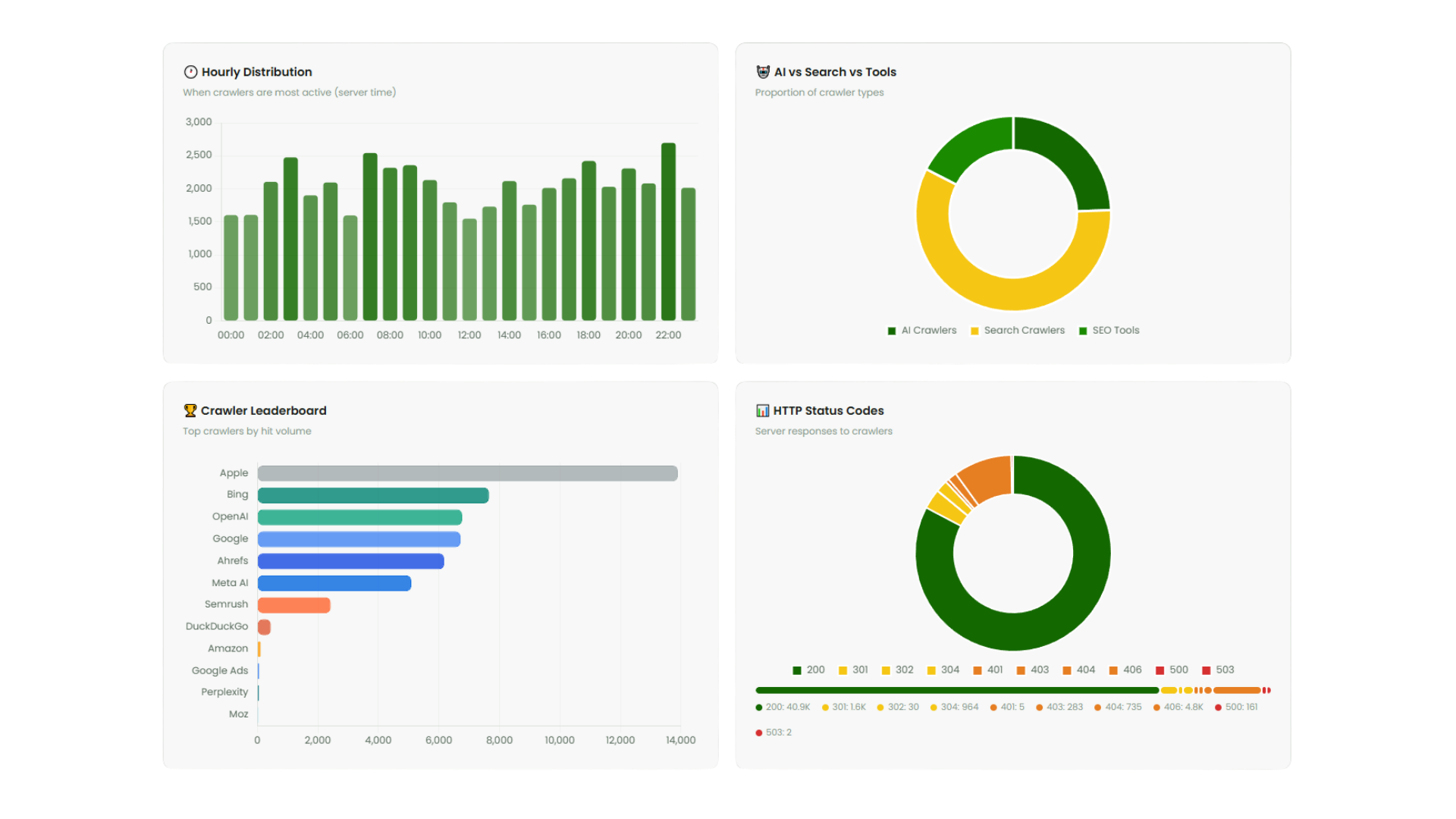
When are crawlers most active on your site? The bar chart shows the distribution across a 24-hour period in server time. Useful for understanding crawl patterns and identifying if bots are hitting your server during peak traffic hours.
AI vs Search vs Tools Split
A doughnut chart showing the proportion of crawler types. At a glance, you can see whether AI crawlers are dominating your bot traffic or if traditional search bots still account for the majority.
Crawler Leaderboard
The top crawlers ranked by hit volume. This tells you immediately which bots are consuming the most server resources and bandwidth.
HTTP Status Code Breakdown
A doughnut chart plus visual status bar showing what responses your server is returning to crawlers. Healthy sites should see predominantly 200 (OK) and 301/302 (redirects). A significant proportion of 404s or 5xx errors is a problem that needs addressing.
Full Crawler Table
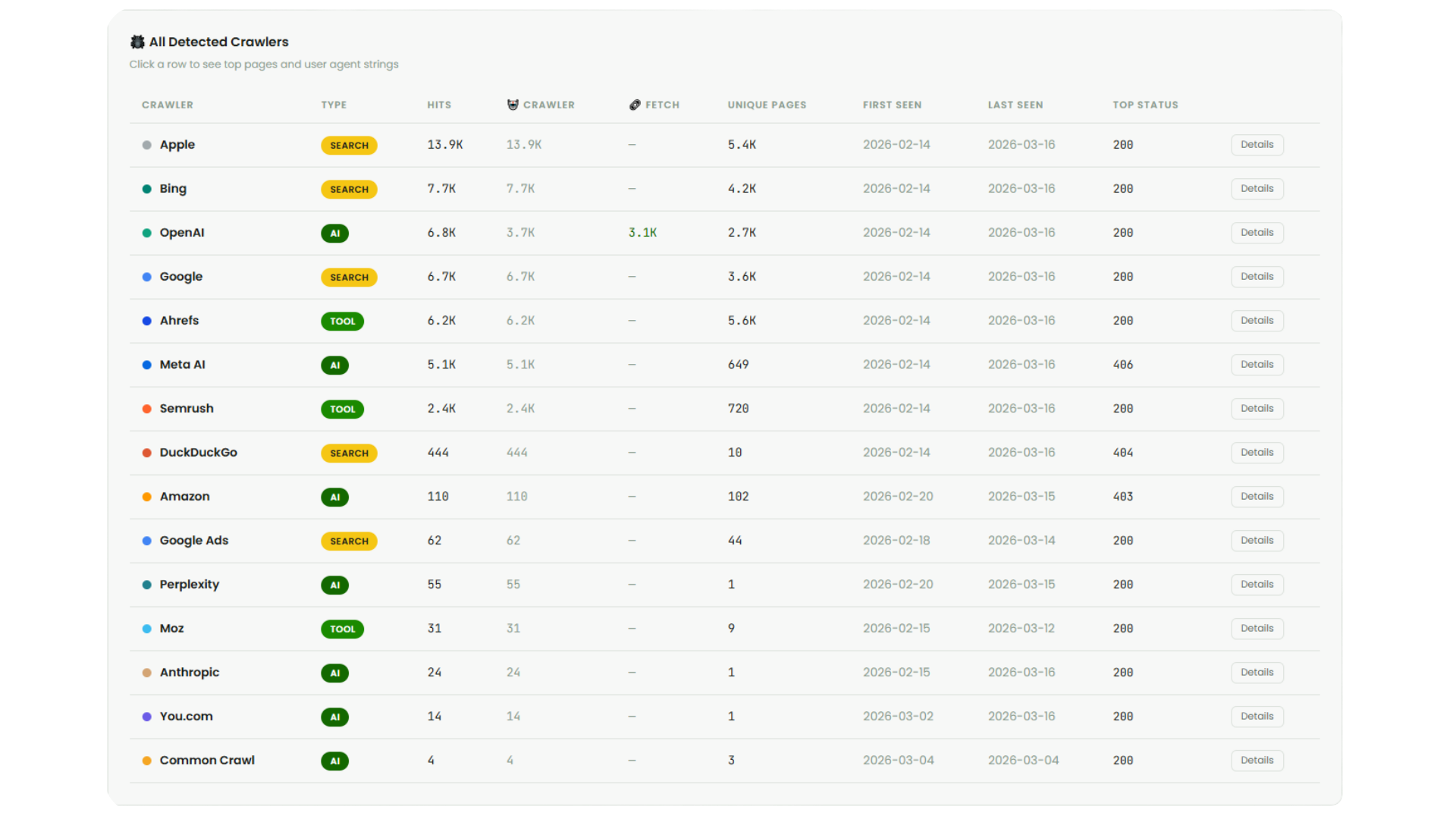
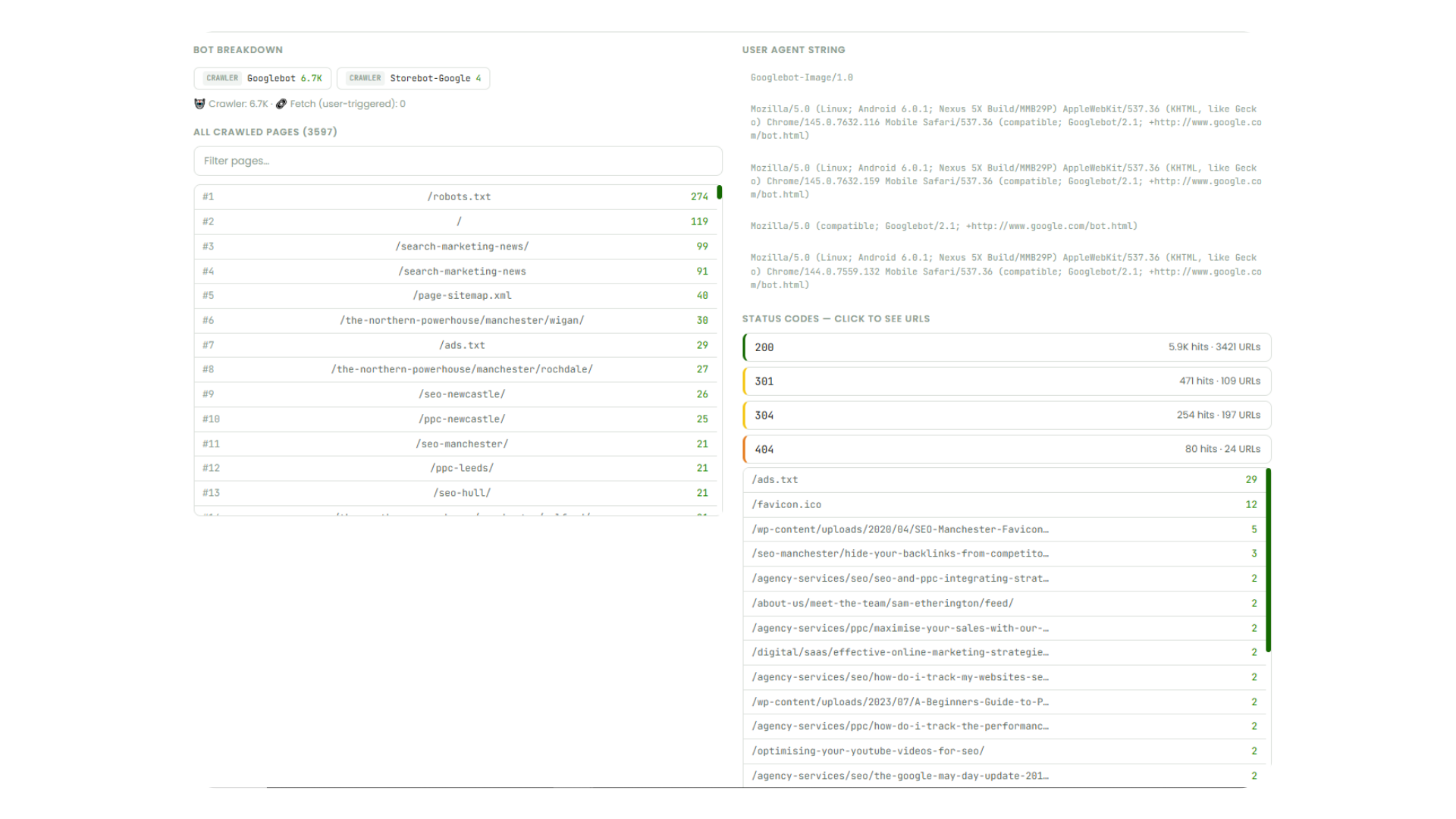
Every detected crawler listed with its type, total hits, crawler vs fetch breakdown, unique pages crawled, first/last seen dates, and top status code. Click any row to expand and see the bot breakdown (individual bot variants within a group), every page that crawler visited, the full user agent string, and a drillable status code breakdown showing exactly which URLs returned which status codes.
Top Pages – All Crawlers & AI-Specific
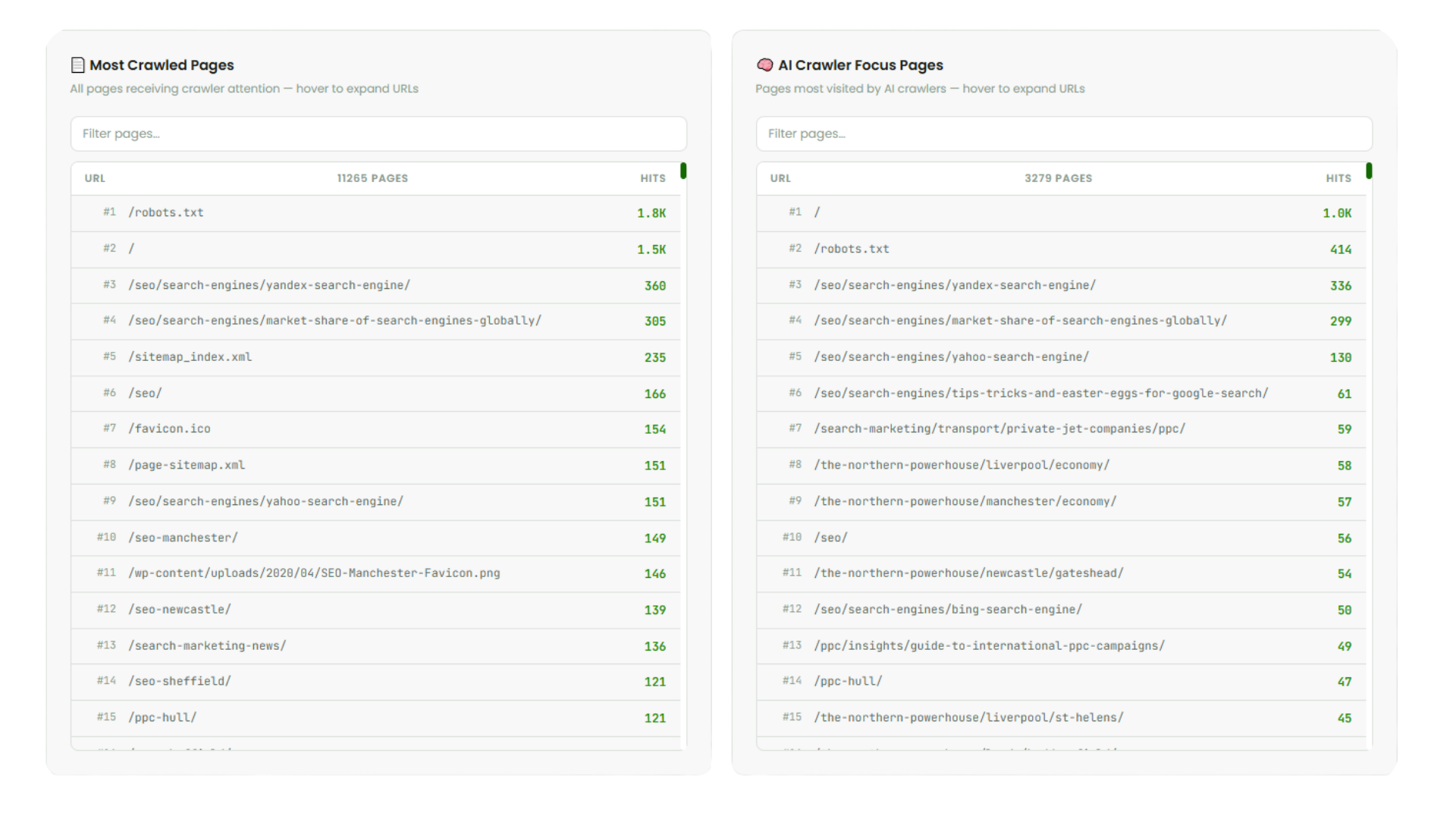
Two side-by-side panels showing the most crawled pages across all bots and the most crawled pages specifically by AI bots. Both are searchable and filterable. The “Hide WP core files” toggle strips out WordPress system files so you can focus on the content URLs that actually matter.
Google Crawl Intelligence: The Real Power
While the AI crawler data is the headline feature, the Google crawl intelligence you get from Gorilla AI Log is arguably just as powerful for day-to-day SEO work.
When Googlebot hits your pages, the access log records the exact URL requested, the exact timestamp, and the exact HTTP status code your server returned. This means you can see things that Search Console either doesn’t show you or shows you days later with significant sampling.
Track When New Content Gets Crawled
Published a new page or blog post? You can see precisely when Googlebot first discovers and crawls it. Cross-reference that with when it first appears in search results and you have real data on your crawl-to-index pipeline. If new content is taking days or weeks to get crawled, that’s actionable intelligence – you may need to address crawl budget, internal linking, or sitemap configuration.
Find Every 404 Google Is Hitting
This is one of the highest-value insights. When Googlebot requests a URL and gets a 404 response, it’s wasting crawl budget on a page that doesn’t exist. Gorilla AI Log shows you every single one of these, with the exact URL and the number of times Google has tried to crawl it. You can drill down into the status code breakdown for Googlebot specifically and see the full list of 404 URLs – then fix them with redirects, restore the content, or clean up the references.
Understand Crawl Frequency
Pages that Google crawls frequently are pages Google considers important. Pages that barely get crawled may be thin, poorly linked, or deprioritised. The hit data per page tells you exactly where Google is spending its crawl budget on your site. Compare that against your own priorities – if your most important commercial pages are getting crawled less than your blog archives or category pages, your internal linking strategy needs work.
Spot Crawl Budget Waste
WordPress sites are notorious for generating crawlable URLs that shouldn’t be crawled: parameter URLs, paginated archives, tag pages, author pages, feed URLs, and wp-admin paths. The “Hide WP core files” filter in Gorilla AI Log strips these out of the view, but when you turn it off you can see exactly how much of Google’s crawl budget is being burned on non-content URLs. For large sites, this can be a significant proportion of total crawl activity.
Monitor All Search Variants
Gorilla AI Log doesn’t just track “Googlebot” as a single entity. It breaks out Googlebot-Image, Googlebot-Video, Googlebot-News, Storebot-Google, and AdsBot-Google as separate crawlers. This means you can see specifically when Google’s image crawler is indexing your visual content, when AdsBot is checking your landing pages, and whether Google News is picking up your articles.
Why Server Logs Are the Most Accurate Data Source
This is the single most important point about Gorilla AI Log: it reads data directly from your server’s access logs. There is no more accurate data source in existence for understanding what’s hitting your website.
Every other analytics and monitoring approach works through a middleman, and every middleman introduces inaccuracy.
Google Analytics (GA4)
Requires JavaScript execution to record a visit. AI crawlers do not execute JavaScript – confirmed by multiple studies including Vercel and MERJ’s analysis of over half a billion GPTBot fetches, which found zero evidence of JS execution. GA4 also filters out known bot traffic by default and is subject to ad blockers, consent banners, and sampling at high volumes. Bot traffic is invisible in GA4 by design.
Google Search Console
Only reports on Googlebot activity. Doesn’t show AI crawlers, Bing, SEO tools, or any other bots. Data is delayed by several days. Coverage is sampled – you’re not seeing every crawl event. And it gives you no status code breakdown by URL, no hourly distribution, and no way to see which specific pages are returning errors to Googlebot.
Third-Party Monitoring Tools
SEO platforms and AI crawler monitors typically rely on JavaScript tags, API integrations, or estimated data. Many can’t see bots that don’t render JS. Some rely on aggregated data from their own customer base rather than your actual server data. None of them have access to the definitive record of what actually happened on your server.
Server Access Logs: The Ground Truth
Your server’s access logs record every single HTTP request that reaches your server. No JavaScript required. No sampling. No filtering. No delay. Every bot visit is logged with the IP address, timestamp, exact URL requested, HTTP method, status code returned, response size, and full user agent string.
This is the definitive, forensic-grade record of what happened. When a bot hits your server, the log captures it regardless of whether the bot executes JavaScript, regardless of whether your analytics tag fired, regardless of ad blockers or consent banners. It’s the raw, unmanipulated truth.
Gorilla AI Log reads this data directly. It doesn’t estimate, sample, or infer. It parses the actual log entries your server wrote and presents them in a format you can act on. You cannot get more accurate data than this.
Actionable Insights: What You Can Do With This Data
Gorilla AI Log isn’t just a monitoring tool – it gives you data you can act on immediately.
Make Informed robots.txt Decisions
The days of “block all AI crawlers” are over. With Gorilla AI Log, you can see exactly which bots are hitting your site and make granular decisions. You might want to block GPTBot (training) while allowing OAI-SearchBot (search visibility). Or allow ClaudeBot but block Bytespider. The data shows you what’s actually crawling your site, so you can make decisions based on evidence rather than guesswork.
Fix Crawl Errors
Every 404 a search engine or AI bot hits is wasted opportunity. The status code drilldown shows you exactly which URLs are returning errors, how often, and to which crawlers. Fix these with proper redirects and you recover crawl budget and potential visibility.
Identify AI Visibility Opportunities
If ChatGPT-User or Claude-Web are fetching certain pages, those pages are being actively referenced in AI conversations. Double down on that content. If AI bots are ignoring your most important pages, investigate why – they may not be well-linked, may be JavaScript-rendered (invisible to AI bots), or may not be structured in a way that’s useful for AI retrieval.
Control Bandwidth and Server Load
Aggressive crawlers can consume significant bandwidth. If Bytespider or CCBot are hammering your server with thousands of requests per day on content you don’t want them to have, block them. Gorilla AI Log shows you the exact volume so you can make proportionate decisions.
Track AI Crawler Growth Over Time
The daily timeline chart shows you how crawler activity changes over time. As AI adoption accelerates, you should expect AI crawler traffic to grow. Monitoring this trend helps you plan for server capacity, make proactive robots.txt decisions, and understand how your content’s role in the AI ecosystem is evolving.
Validate Fresh Content Indexing
When you publish new content, use Gorilla AI Log to confirm it’s being picked up. Check when Googlebot first crawls it. Check whether AI crawlers discover it. If new pages aren’t getting crawled within a reasonable timeframe, you’ve identified a technical SEO issue that needs fixing.
Feeding Into Gorilla Reports
Gorilla AI Log doesn’t exist in isolation. It feeds directly into Gorilla Reports, our reporting platform, so crawler intelligence becomes a standard part of your ongoing performance reporting.
This means your monthly reports don’t just show rankings, traffic, and conversions – they show you how search engines and AI systems are interacting with your site at server level. You can track crawler trends over time, monitor for new bots appearing, and ensure that crawl health is maintained as part of your broader SEO strategy.
The connection between the two platforms is seamless: the file on your server speaks directly to Gorilla Reports, and the data flows through automatically. No manual exports, no screenshots, no copy-pasting data between tools.
Setup: Two Files, Five Minutes
Getting Gorilla AI Log running on your site is deliberately simple:
1. We upload two files to your cPanel hosting – an HTML dashboard and a PHP API file.
2. The PHP file is configured with a password and automatically detects your server’s log file locations.
3. That’s it. Visit the dashboard URL, enter the password, and you’re looking at your crawler data.
It works exclusively with cPanel hosting environments, which covers the vast majority of shared and managed hosting setups. The tool reads your existing access logs – no additional logging configuration needed. It’s lightweight enough that it won’t impact server performance, and because it’s entirely self-hosted, your log data never leaves your server.
Because cPanel retains historic access logs, you’re not starting from zero. Depending on your host’s retention policy, you may have weeks or months of historic data available immediately.
The Bottom Line
AI-powered search isn’t coming – it’s here. ChatGPT handles billions of queries. Perplexity, Claude, and Gemini are growing rapidly. AI Overviews now appear in over 13% of Google search results. The way people discover and consume content is fundamentally changing, and the bots powering these systems are already on your server.
The question isn’t whether AI crawlers are hitting your site. They are. The question is whether you can see them, understand what they’re doing, and make informed decisions about how your content participates in the AI ecosystem.
Gorilla AI Log gives you that visibility – from the most accurate data source possible: your own server.
Want to see what’s crawling your website? Get in touch with Gorilla Marketing and we’ll get Gorilla AI Log set up on your site.

